

From Michigan to Yellowstone with One App
One of the challenges I face when planning a long road trip is finding interesting things to see and do that are along my planned path. Sure, it’s easy to find the big hit sites, after all, who’s going to miss the Grand Canyon or the Golden Gate Bridge? What I’m talking about are the small, hidden gems that don’t make the “Top 10 Sites to See…” lists.
In addition to finding things to see and do, there’s the task of planning your route efficiently, finding good lodging, and tracking down great places to eat. These are all tasks that can take hours of planning and research. That is, unless you have a tool that makes it all easier.
That’s where Roadtrippers comes in. This website and app help you discover unique places, build customized routes, and manage the logistics that turn an ambitious idea into a smooth and memorable journey.
I used Roadtrippers to plan a 15-day family trip from Michigan to Yellowstone and Grand Teton National Parks, and it completely changed how I approach road trip planning.
In this post, I’ll show you what Roadtrippers can do, from the early planning phase to the on-the-road execution, and use it to kick off my upcoming four-part series on that grand 15-day expedition west.
What Is Roadtrippers?
Roadtrippers is both a website and mobile app designed to help travelers plan road trips by combining discovery, routing, and logistics into one tool.
Here’s a quick overview of what it offers:
- Route and itinerary planning: Enter a start and end point and the app builds a complete itinerary, including rest and gas stops.
- Discovery of unique places: Its massive database includes millions of points of interest, from well-known landmarks to lesser-known “hidden gems.”
- User reviews and ratings: See what others think of attractions, restaurants, and campgrounds before you commit.
- Curated guides: Professionally created lists and routes provide inspiration for new adventures.
- RV-specific navigation: Pro users can access routing that accounts for height, weight, and turn restrictions.
- Cross-platform availability: Trips sync automatically between desktop, iOS, and Android.
- Autopilot suggestions: The premium version can even suggest optimized stops and routes based on previous trip data.
The free version is fine for short adventures, but it limits the number of stops you can add. The Pro version, which I used, unlocks longer trips, offline maps, and live traffic updates, all worth it when you’re crossing half the country.
What I love most is how it lets you save and share trip plans and discover those quirky roadside attractions that make a road trip memorable.
So why not just use Google Maps? Because while Maps is great for getting somewhere fast, Roadtrippers is built for the journey itself. It focuses on discovery and planning multi-day routes filled with unique experiences. I still use Google Maps for real-time traffic and navigation, but Roadtrippers is where the adventure begins.
Why Use an App to Plan a Road Trip?
If you’ve ever tried to coordinate a multi-day road trip using only notes, browser tabs, and bookmarks, you know how messy it can get. Long trips require balancing must-see attractions with realistic drive times, rest days, and a little flexibility for spontaneity.
Before I found Roadtrippers, I had a tendency to plan our trips down to the minute. Every day was packed with must-see stops and precise arrival times, which didn’t leave much room for the unexpected. Using Roadtrippers helped me visualize the overall flow of each day and build in flexibility so we could slow down and enjoy unplanned discoveries along the way.
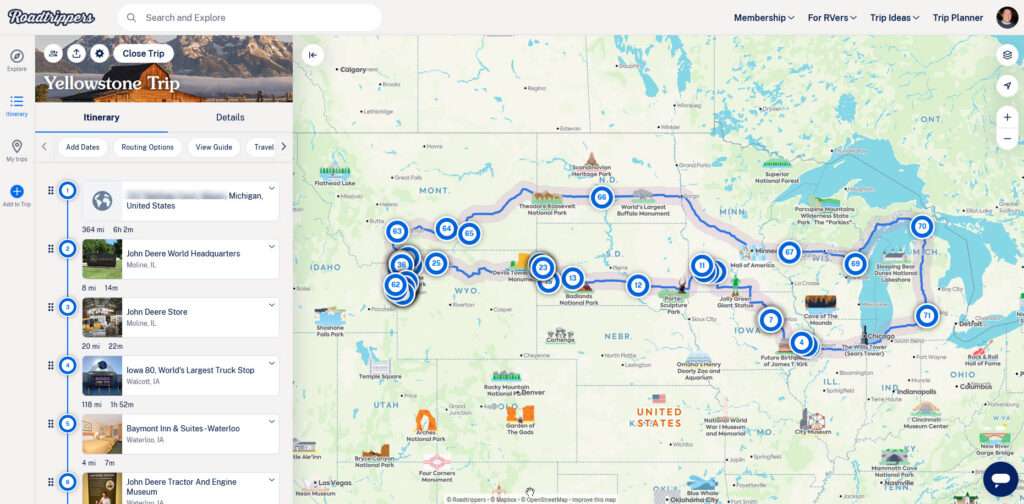
How I Used Roadtrippers to Plan Our Yellowstone Trip
Here’s how I used Roadtrippers to turn a big idea: driving from Michigan to Yellowstone and Grand Teton, into a well-paced, 15-day itinerary that worked for the whole family.
- Start and finish at home.
I began by entering our home as both the starting and ending point so the route would loop cleanly across the country and back. - Add the major attractions first.
Next came the must-sees like Yellowstone, Mount Rushmore, and a few others. I also made sure to get input from my fellow travelers. It’s everyone’s vacation, and letting each person pick a few “must stops” keeps everyone engaged. - Decide how far to drive each day.
I determined how many hours we wanted to spend on the road each day, then used that distance to identify potential overnight cities. From there, I looked at available lodging in those areas and added our preferred stops to the itinerary. - Search for hidden gems along the way.
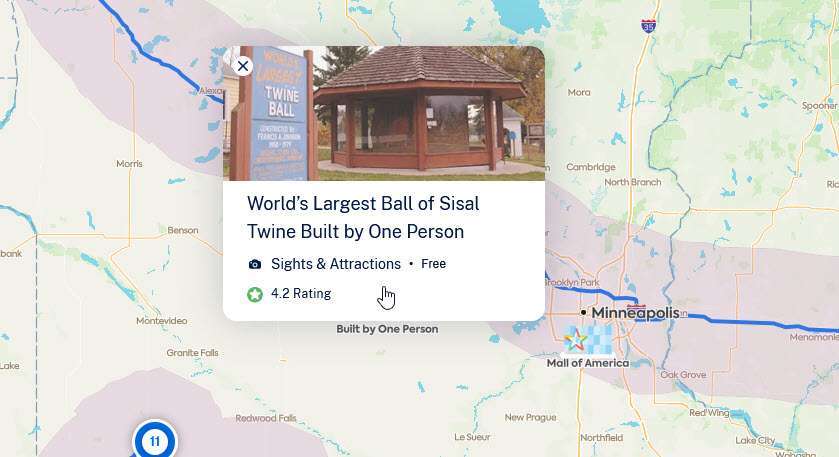
One of my favorite features in Roadtrippers is the ability to set a distance radius on either side of your route. I used it to find highly rated attractions, great food stops, and unexpected detours that we otherwise would have driven right past. - Estimate time at each stop.
For every attraction, I made a quick assessment of how long we’d likely spend there. Old habits die hard, so I also kept a simple spreadsheet with a running tally of drive times, meals, and sightseeing to make sure each day still fit comfortably within our available hours. That little extra step helped me build realistic days that left room to relax rather than rush. - Verify mileage and drive times.
Once the stops were in place, I checked the total mileage and drive times for each day. Small adjustments here made a big difference in keeping the trip comfortable and flexible. - Finalize and share the plan.
When everything looked right, I finalized the route and shared it with the family through Roadtrippers. Everyone could view the itinerary on their own device, which made it easy to stay in sync once we hit the road.
All of these steps except for the spreadsheet were completed in Roadtrippers and it made this process enjoyable rather than overwhelming. It kept all the pieces, routes, lodging, attractions, and timing, organized in one place and let me focus on the fun part: planning the adventure, not just managing the details.
Strengths and Limitations of Roadtrippers
What It Does Well
- Easy to use: The interface is intuitive, and building or adjusting routes takes only a few clicks.
- Great for discovery: It excels at uncovering those hidden roadside attractions, scenic viewpoints, and offbeat local stops that make a trip memorable. You’ll see in a future post how this really benefited us by exposing us to an attraction that we would have driven right by without even considering a stop.
- Collaborative and shareable: You can easily share your trip plan with family or travel companions, keeping everyone on the same page.
- Keeps you organized: Having all your stops, notes, and routes in one place makes pre-trip planning far less stressful.
What Could Be Better
- Feature limitations in the free version: Long routes and offline maps are reserved for Pro subscribers.
- Connectivity required: Full functionality depends on having a data connection, so it’s smart to download offline maps before hitting remote areas.
- Minor syncing quirks: Occasionally, edits on one device take a moment to appear on another.
- No guidance on visit duration: It would be incredibly helpful if Roadtrippers included a “typical time spent” estimate for each attraction. When you’re planning multiple stops in a single day, it’s hard to know whether a location is a quick 20-minute detour or a three-hour experience. That small detail would make pacing a long trip much easier.
None of these were deal-breakers, and honestly, the time it saved me more than justified the Pro subscription. When we hit stretches of poor cell coverage, I simply downloaded offline maps before we left each morning.
Tips for Getting the Most Out of Roadtrippers
- Start early. Add your major destinations first, then fill in the smaller attractions later.
- Use it with other tools. Roadtrippers for planning, Google Maps for live navigation is a winning combo.
- Leave breathing room. Don’t pack every day too tightly. You’ll want time for unplanned stops.
- Go Pro if your route is long. The upgrade is worth it for extended trips, offline access, and RV routing.
How Roadtrippers Improved Our Trip
Using Roadtrippers turned planning from an overwhelming chore into a creative process. It helped us find unique stops that became highlights of the trip, kept our days balanced, and ensured we didn’t miss opportunities along the route.
Without it, we probably would have skipped spots like the South Dakota Tractor Museum in Kimball, SD, or overestimated how far we could drive comfortably in a single day. Instead, every leg felt intentional and well-paced.
It made me realize that a great trip doesn’t start when you hit the road, it starts with how you plan it.
What’s Next: My 4-Part Yellowstone Road Trip Series
Now that you know how the trip was planned, the next posts will dive into what we actually saw and experienced.
Here’s what’s coming:
- Part 1: Days 1–5 – The Journey West
- Part 2: Days 6–10 – Exploring Yellowstone
- Part 3: Days 11–15 – Grand Teton and the Return Home
- Part 4: Reflections and Lessons Learned
Follow along as I share our favorite moments, photos, and the stories behind the places we discovered using Roadtrippers.
Plan Smarter, Travel Better
If you love road trips but hate juggling maps, spreadsheets, and travel notes, Roadtrippers might just become your favorite planning tool. It took the stress out of organizing our Yellowstone adventure and helped us enjoy the journey instead of just the destination.
Whether you’re heading across the country or just exploring your own state, give Roadtrippers a try for your next trip. You might be surprised at what you discover along the way.
And stay tuned, the Yellowstone adventure itself is up next.
👉Do you have a go-to method for keeping your road trip plans organized? Tell me in the comments, your tip might help someone else planning their next big drive.